
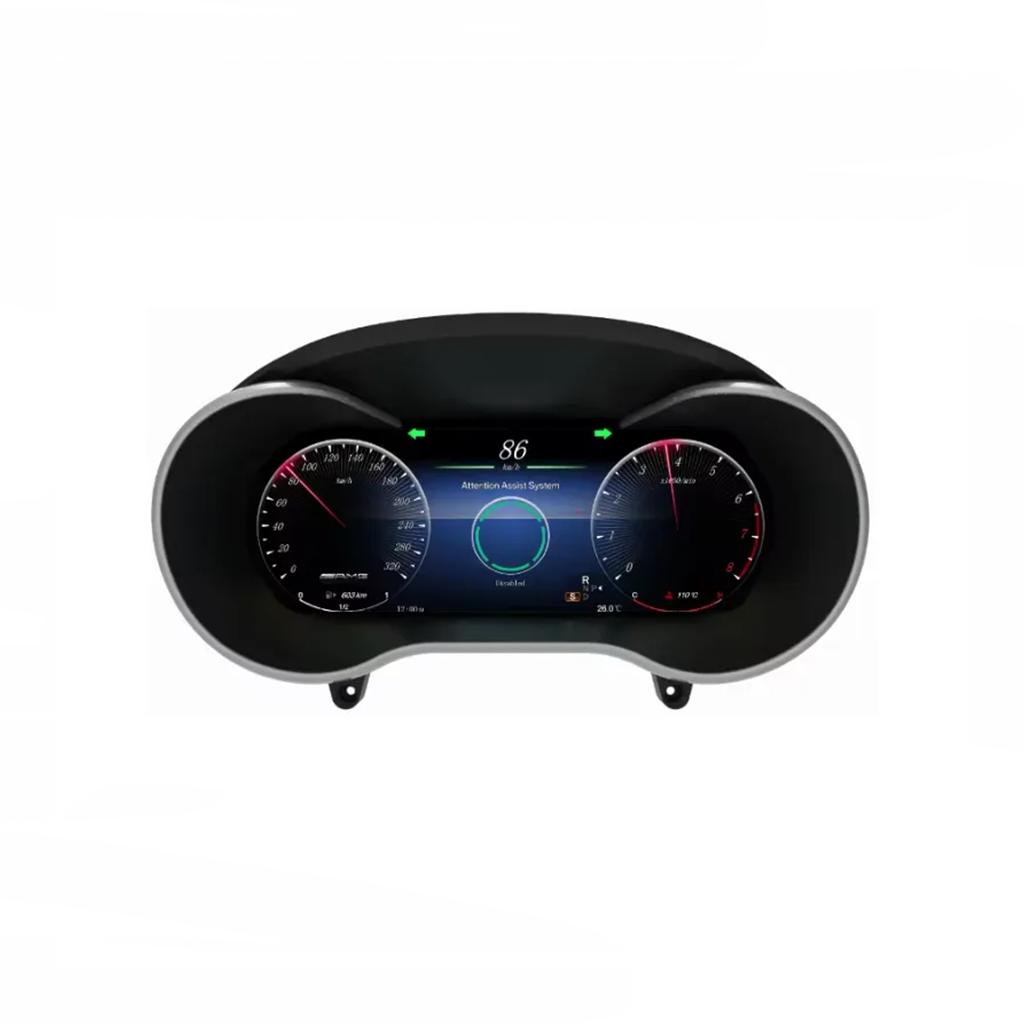
Mercedes C GLC Digital Cluster 2017 W205/X253 NTG5.0 with 12.3-Inch CarPlay
$ 92.47
Mercedes C-Class W205 / GLC X253 · 2017 NTG5.0 Mercedes C GLC Digital Cluster with a cleaner 12.3-inch cockpit view This Mercedes C GLC digital cluster upgrades the driver-facing display from the older analog-style layout to a modern 12.3-inch digital instrument interface. It gives you clearer daily driving information, a more current cabin appearance and built-in CarPlay and Android Auto access in the driver’s line of sight. iKAGOO prepares the version according to your model year, factory system, dashboard layout and connector details, so you are not choosing only by product photos. Digital Cockpit Guide All Digital Clusters Mercedes Digital Clusters Compatibility Check Quick Answer What is this Mercedes C GLC digital cluster? This Mercedes C GLC digital cluster is a 12.3-inch digital instrument cluster upgrade for 2017 Mercedes C-Class W205 and Mercedes GLC X253 vehicles with the NTG5.0 route. It upgrades the driver display with a Linux-based interface, Wireless CarPlay, Android Auto, multiple display themes and supported real-time vehicle data through CANBUS. Original steering-wheel controls, parking sensor information and warning data are retained after correct version matching, connection and configuration. Before shipment, iKAGOO checks your vehicle year, factory system, dashboard layout, LHD/RHD position and connector photos to prepare the correct version. For broader purchase logic, compare this route with the iKAGOO Upgrade Necessity Standard and the Digital Dash Buying Guide. Check This Cluster Send Vehicle Photos Fitment Focus Confirm the correct route before shipping Model names can differ by region, but the upgrade decision should not be made by badge name alone. iKAGOO checks the vehicle generation, model year, factory system, dashboard shape and connector route before preparing your order. Primary modelMercedes C-Class W205 Related modelMercedes GLC X253 / W253 route Listed year route2017 Factory system routeNTG5.0 Driver positionLHD and RHD supported Main product typeDigital Instrument Cluster Buying Guide Why iKAGOO Support Guide Installed look that keeps the Mercedes cabin familiar The upgrade is designed to sit inside the original driver display area instead of looking like a random add-on screen. You get a more modern dashboard while the cabin still feels like a Mercedes C-Class or GLC interior. For daily driving, the clearer digital view helps navigation, speed and vehicle information feel easier to read. Before and after upgrade value you can see immediately The old cluster layout may still function, but it does not give the same visual clarity or modern cabin feeling. After installation, the digital interface gives the driver a cleaner and more premium display experience. This is why this route belongs naturally under iKAGOO premium digital cockpit upgrades. Multiple visual themes for different driving moods The 12.3-inch IPS display gives your vehicle a more flexible cockpit style than the fixed analog gauge design. Different display themes help the cabin feel newer without changing the whole dashboard structure. The upgrade still depends on correct vehicle-system preparation, which is why the Factory Function Retention Standard matters. Matched shape and rear housing matter for clean installation A digital cluster upgrade is not only about the front screen. The housing, connector position and vehicle-interface route affect how cleanly the unit fits and how stable the functions are after installation. Use the iKAGOO Installation Ease Level Standard to understand the required installer skill before ordering. iKAGOO Product Evaluation Three Checks Before You Buy This Digital Cluster These checks explain upgrade value, original vehicle compatibility and the right installation path before you order. They also connect this product to iKAGOO’s public buying standards instead of leaving the customer with only a product claim. iKAGOO Standard Upgrade Necessity 92 / 100 Strong Upgrade Case This score explains why the upgrade makes sense for daily use, not only whether the cluster looks modern. The 12.3-inch IPS cluster improves the main driver-facing display used every day. Wireless CarPlay and Android Auto add phone-based navigation, music and calls in the driver’s view. CANBUS vehicle data keeps the upgrade focused on a real dashboard function, not only screen decoration. Compared with repairing an old analog cluster, this gives a broader cockpit improvement. Read the iKAGOO Upgrade Necessity Standard iKAGOO Standard Original Vehicle Compatibility 91 / 100 Near-OEM Match A 91/100 score does not mean that 9% of factory functions are lost. It measures vehicle-data retention, hardware matching and version preparation quality. Factory Function Continuity25% Original Control Continuity15% Vehicle Data & Warning Integration20% Physical Architecture Match15% Factory-Style UI & Interaction Match15% Installation & Hardware Integration10% Supported vehicle data and warning information continue through CANBUS integration. Steering-wheel control and parking-related information are retained after correct connection and setup. Dashboard layout, LHD/RHD position and connector details are checked before shipment. Read the iKAGOO Original Vehicle Compatibility Standard iKAGOO Standard Installation Ease Level Level 3 / 5 Advanced DIY Level 3 means this route is suitable for experienced DIY installers or an automotive electronics installer who can remove trim, connect matched wiring and test functions before final assembly. Requires original cluster removal and careful dashboard access. Requires CANBUS, harness and connector checks before reassembly. No intentional cutting of supported factory wiring is part of the intended route. Function testing should be completed before the trim is fully restored. Read the iKAGOO Installation Ease Level Standard Factory Functions Retained Original vehicle functions supported after correct installation This digital cluster upgrade is designed to keep the supported original Mercedes vehicle logic working through the matched wiring and CANBUS route. For the full decision framework, read the iKAGOO Factory Function Retention Standard. Steering-wheel controls Original steering-wheel controls are supported after correct connection and configuration. This helps daily operation feel familiar instead of forcing you to relearn basic controls. Vehicle warnings and data Supported warning information, driving data and status information continue through CANBUS communication. The cluster upgrade remains connected to the vehicle system instead of acting as an isolated screen. Parking sensor information Parking-related information is retained when the correct version and configuration are used. This matters because the driver display must still support practical daily driving functions. LHD and RHD route Left-hand-drive and right-hand-drive vehicles are supported according to the product route. You should still provide the requested dashboard photos so the correct version can be prepared. Supported wiring approach The intended route uses matched harness and interface connection without intentional cutting of supported factory wiring. This keeps the installation cleaner and more reversible. Special configuration check Special factory audio systems, non-standard cameras, previous aftermarket modifications or uncommon regional configurations may require additional connection instructions. Specifications Mercedes C GLC Digital Cluster Specs Display size12.3-inch IPS Resolution1920×720 Refresh rate60Hz Viewing angle178° SystemLinux OS CPUT507 Plus quad-core 1.8GHz ConnectivityWireless CarPlay / Android Auto Vehicle dataCANBUS integration Voltage12V DC Power36W max Operating temperature−30°C to 85°C Storage temperature−40°C to 90°C Related Upgrade Paths Need the center screen too? If your goal is a full cabin refresh, the digital cluster can be considered together with a vehicle-specific Mercedes Android head unit. These are separate products, but they answer different upgrade needs: the cluster improves the driver display, while the Android head unit improves the center-screen infotainment experience. W205 Android Head Unit NTG5.0 Android Head Unit Mercedes Android Head Units Android Car Stereo Guide Why Buy from iKAGOO Version matching is the real protection on this upgrade A Mercedes digital cluster can look correct in photos but still need the right vehicle route, connector match and configuration. iKAGOO helps reduce that risk before the product leaves for international shipping. Read Is iKAGOO Reliable? for the broader support process. Vehicle checked before shipment iKAGOO may check the model year, factory NTG system, dashboard layout, LHD/RHD position and connector photos before shipment. Correct version preparation The prepared order may include the cluster, matched harness, CANBUS interface and related accessories according to your vehicle route. Installation support route If your installer finds a cable, setting or function issue, iKAGOO will ask for photos, videos and connection details instead of guessing. Policy-based handling Shipping, warranty and return boundaries are handled through published policy pages, not vague promises after payment. Compatibility & Installation 24-Hour Response Support Global Shipping Guide 1-Year Warranty Guide After You Order What Happens After You Place an Order? This is the support flow iKAGOO uses to help you move from checkout to installation with fewer wrong-version and wrong-connection risks. For policy details, review the Shipping Policy, Warranty Policy and Return and Refund Policy. Step 1 Secure checkout and order record Your website order creates the order number used for shipment, compatibility follow-up and later support. Step 2 Vehicle information review iKAGOO checks or reconfirms the vehicle model, year, LHD/RHD position, factory system, original cluster photos and connector details when needed. Step 3 Correct version preparation The cluster, wiring route, CANBUS interface and configuration path are prepared according to the confirmed vehicle information. Step 4 Product photo before packing, when requested If you request it before packing, iKAGOO can provide photos of the prepared product and visible accessories before dispatch. Step 5 Packing and dispatch After version preparation and packing, the order is dispatched. Processing time can vary when vehicle-specific preparation is needed. Step 6 Tracking and shipping follow-up Tracking information is added after dispatch. DDP and local carrier updates may appear at different stages after customs or carrier handover. Step 7 Installation and configuration support If a function does not work during installation, iKAGOO may request photos, videos, wiring status, software version and symptom details. Step 8 Engineer escalation when needed When the issue is beyond basic setting guidance, useful evidence can be organized for the relevant equipment engineer to judge the next route. Step 9 Cable, software or hardware handling If a cable, setting, software or hardware issue is confirmed, iKAGOO will follow the appropriate support route based on product status and policy. DDP Duty-Free Shipping Shipping Policy Warranty Policy Return & Refund Policy Compare Your Upgrade Options Why this route is stronger than cheaper-looking alternatives The right decision depends on whether you want only a repair, a phone interface, or a real driver display upgrade. iKAGOO Mercedes C GLC digital cluster This route upgrades the driver-facing display, adds CarPlay and Android Auto value, keeps supported vehicle data through CANBUS and includes vehicle information checking before shipment. Repairing the old analog cluster Repair may keep the car usable, but it does not modernize the cabin or add a clearer digital cockpit. It is a maintenance choice, not a complete upgrade. Used OEM parts route Used parts may create coding, connector, VIN, mileage and compatibility questions. This can be a larger retrofit path than many buyers expect. CarPlay-only module A CarPlay-only module can improve phone connectivity, but it does not replace the analog driver cluster or create the same dashboard transformation. FAQ Mercedes C GLC Digital Cluster FAQ These answers focus on fitment, retained functions, installation, shipping and support for the 2017 W205 / X253 NTG5.0 upgrade route. Will this Mercedes C GLC digital cluster fit my exact model year? It depends. This product route is for the listed 2017 Mercedes C-Class W205 and GLC X253 NTG5.0 configuration. Send your model year, dashboard photo and original cluster photo before shipment if your vehicle is a regional or special configuration. You can also use the compatibility and installation guide. Will original steering-wheel controls still work? Yes, supported steering-wheel controls continue to work after correct connection and configuration. This is part of the iKAGOO original function retention logic explained in the Factory Function Retention Standard. Does it support Apple CarPlay and Android Auto? Yes, this Mercedes C GLC digital cluster includes Wireless CarPlay and Android Auto support. It gives you navigation, calls and music in a more modern driver display experience. Do I need to cut factory wiring? No. The intended route uses matched wiring and interface connection without intentional cutting of supported factory wiring. If your installer finds a connector mismatch, stop and contact iKAGOO before changing the wiring. Is it suitable for DIY installation? It depends. The iKAGOO Installation Ease Level is Level 3 — Advanced DIY. It is suitable for experienced DIY installers or an automotive electronics installer who can remove trim, connect harnesses and test CANBUS-related functions carefully. What happens after I place the order? After checkout, iKAGOO can review vehicle details, prepare the correct version, pack the order, provide tracking and support the installation route. You can read the broader customer process on Is iKAGOO Reliable?. Can I choose DDP shipping? It depends on destination and checkout availability. For eligible routes, DDP can help reduce surprise import duty handling. Read the DDP duty-free shipping guide before ordering. What if software, settings or firmware are required? It depends. If the issue is confirmed as software, settings or firmware related, iKAGOO can coordinate instructions or files when appropriate for the exact hardware version and problem. Support handling follows the relevant iKAGOO support guide. Internal Link Hub Useful iKAGOO Pages Before You Order This link hub helps buyers compare the product, understand the standard, check related Mercedes upgrades and review shipping or warranty policies before purchase. Category Guide Premium Digital Cockpit Upgrades Understand iKAGOO’s broader digital cluster and virtual cockpit upgrade direction. Category All Digital Instrument Clusters Browse vehicle-specific digital clusters across supported vehicle brands. Mercedes Category Mercedes-Benz Digital Clusters See other Mercedes-Benz digital cluster upgrade options. Buying Guide Digital Dash Instrument Cluster Guide Use this guide to check fitment, function retention and installer requirements. iKAGOO Standard Upgrade Necessity Standard Understand why this upgrade has stronger value than simple repair. iKAGOO Standard Original Vehicle Compatibility Standard Review how original functions, controls, vehicle data and warnings are assessed. iKAGOO Standard Installation Ease Level Standard Check the installer skill and preparation level for vehicle electronics upgrades. Compatibility Compatibility and Installation Learn what vehicle photos and information help iKAGOO prepare the correct version. Related Product Mercedes W205 Android Head Unit Consider the center-screen upgrade if you want a broader cabin refresh. Related Product Mercedes NTG5.0 Android Head Unit Compare the NTG5.0 infotainment upgrade path with the digital cluster route. Shipping DDP Duty-Free Shipping Guide Check whether tax-included shipping may apply to your destination. Policy iKAGOO Warranty Policy Review hardware warranty coverage and support boundaries before ordering. Policy Return and Refund Policy Understand approved return steps, refund scope and vehicle-specific product handling. Policy Shipping Policy Review processing time, international tracking and delivery expectations. Support 24-Hour Response Support Understand how iKAGOO handles installation and after-sales support requests. Contact Send Vehicle Photos Contact iKAGOO before shipment if you are not sure about dashboard or connector match. Order This Digital Cluster View Mercedes Digital Clusters